
In this guide
Your cameras may already capture everything that happens on site. The harder question is: who notices when something needs attention?
A worker enters a construction area without a hard hat. Someone smokes in a restricted public space. An older resident falls during the night. A trash bin overflows before the cleaning team arrives. An ordinary surveillance system can record these events, but without suitable analytics, someone must watch the footage to recognize them.
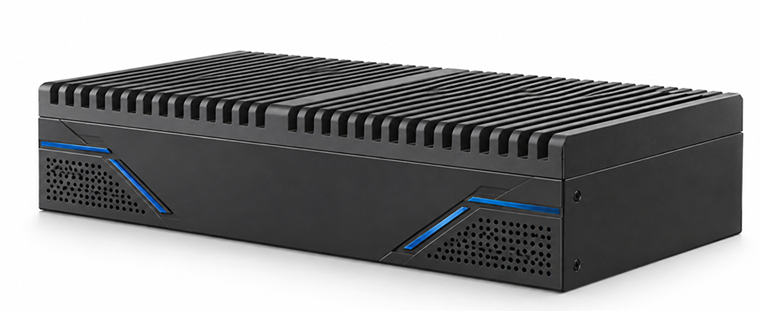
The US-HAB04 AI BOX is built for upgrading conventional security surveillance with AI video analysis and event alerts. For compatible IP camera installations, it can add intelligence while retaining the existing cameras and recorder, helping avoid the disruption of a full system replacement.
Give Existing Cameras a New Role
Replacing cameras, a recorder and associated equipment can involve new hardware, installation labor, configuration and site disruption. When the existing system still provides useful video, a targeted analytics upgrade may be a more practical approach.
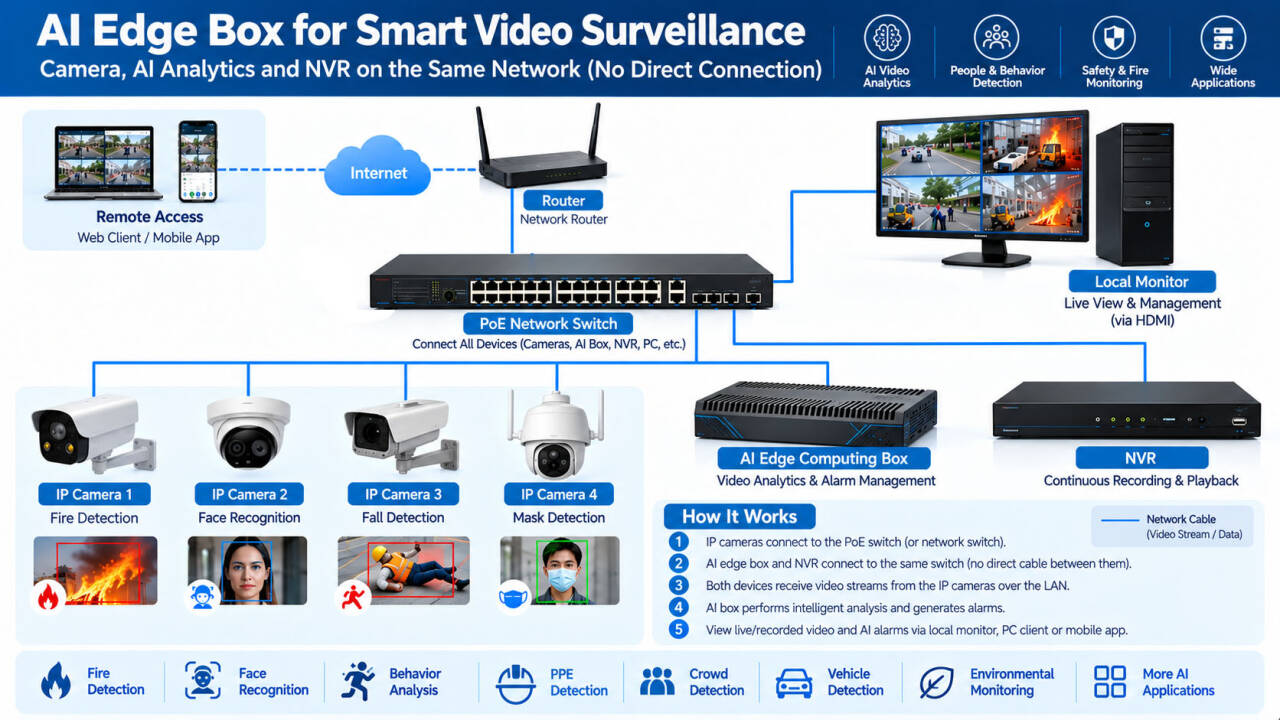
The US-HAB04 receives video streams from compatible network cameras and analyzes them for configured events. The existing NVR can continue its recording role, while the AI BOX handles selected analytics and alarm reporting. These are complementary functions on the same network.
There is no need to replace compatible cameras and recording equipment simply to add this analysis layer. However, the camera streams, network and intended integrations must be checked first. The supplied specification supports ONVIF and RTSP network camera connections; it does not establish direct support for every legacy analog system.
Practical Applications for Everyday Safety and Operations
Construction Sites: Identify Missing Protective Equipment
Supervisors cannot observe every camera continuously. A configured no-hard-hat detection rule can help flag workers entering a monitored view without a helmet. The listed algorithm range also includes missing reflective clothing, work clothes and selected other protective equipment.
These alerts can direct a supervisor to footage that needs review, supporting site checks without requiring staff to watch every screen at once. Camera position, image detail and visibility of the relevant equipment should be evaluated on site.
Public Spaces: Flag Smoking in Restricted Areas
In monitored no-smoking areas, smoking detection can help bring a possible incident to the attention of responsible staff. Rather than discovering it only during a later footage search, staff can review the reported event and decide how to respond.
Configure the rule for appropriate camera views and test it under the lighting, distance and occupancy conditions of the location.
Senior Care Facilities: Bring Possible Falls to Staff Attention
A fall in a monitored corridor or shared area may go unnoticed when staff are elsewhere, particularly overnight. Fall detection can provide an additional way to flag a possible incident for prompt review.
This application requires careful camera placement, suitable nighttime image quality and a tested alert-response process. Video analytics supports staff awareness; it does not guarantee detection of every fall or replace care staff, medical assessment or emergency procedures.
Waste Collection Areas: Spot Overflowing Bins
Overflowing bins can be visible on camera long before a cleaning team checks the location. The listed analytics include trash-bin overflow, open-bin detection and exposed trash, providing options for identifying conditions that may need attention.
For property managers and cleaning teams, a configured event can help prioritize inspection and collection instead of relying only on fixed rounds or complaints.
More Applications Across Facilities and Workplaces
The product's listed algorithm range covers more than 70 detection scenarios across multiple application categories. Examples include:
- Perimeter protection: intrusion, line crossing, entering an area and leaving an area.
- Occupancy and movement: people counting, overcrowding, long stays and selected abnormal movement events.
- Facility conditions: smoke or fire indicators, obstructed evacuation routes, removed objects and selected leak-related observations.
- Workplace behavior: absence, sleeping on duty, smoking and mobile phone use.
- Vehicle operations: illegal parking and selected forklift, congestion and traffic events.
The scenario range describes the available capability list, not the number of algorithms that can run at once. Confirm the required algorithms, firmware, configuration and supported combinations before ordering. Safety-related video alerts should supplement dedicated safety systems and established procedures.
For network planning, review our IP camera category and NVR category. A category listing is not a compatibility certification: confirm the exact camera stream and recorder configuration before selecting an upgrade.
How an AI Upgrade Works
- Review the existing system. Identify camera models, resolutions, codecs, available streams and network access.
- Connect the AI BOX to the local network. Make the selected camera streams accessible to the device while retaining the recorder's existing role.
- Choose the events that matter. Assign analytics to the appropriate channels and configure detection areas and event settings.
- Set up alarm review and response. Confirm how staff or an integrated platform will receive and review events.
- Test under real conditions. Check daytime and nighttime views, missed events, unwanted alerts and the response workflow before expanding deployment.
Browser-based operation is recommended in the datasheet, and English is supported. This provides a practical configuration interface; installation effort still depends on camera compatibility, network access and integration requirements.
Key Specifications and Limits to Plan Around
- Video input: four channels, supporting 2MP-8MP H.264 or H.265 network cameras.
- Camera connectivity: ONVIF and RTSP support for third-party cameras.
- Network: two adaptive 10/100/1000 Mbps Ethernet interfaces with separate IP settings.
- Included storage: a 2.5-inch 128GB SSD and 4GB DDR4 memory.
- Alarm storage: specified maxima of 20,000 alarm images and 20,000 alarm video clips.
- Integration: four alarm inputs, four alarm outputs, RS-485, and listed WebSocket and HTTP/HTTPS modes.
- Power: 12 VDC, 2 A supply; consumption no more than 20 W.
- Design: compact, fanless enclosure; specified operating temperature of -40°C to +70°C (-40°F to +158°F).
Each unit supports four video channels. A larger installation needs channel planning and may require additional units. Face detection and behavior analysis cannot be enabled simultaneously on the same channel.
Alarm-event storage is not a guarantee of continuous recording retention. Keep the recorder's storage plan separate, and confirm alert delivery and software integration against the project requirements. The supplied datasheet does not provide a detection accuracy percentage or a complete concurrent-algorithm performance matrix.
Upgrade What You Have with US Vision
The US-HAB04 is especially relevant to older, conventional IP surveillance installations that still provide usable video but lack the event analysis the site now needs. It offers a way to focus an upgrade on intelligence, preserving compatible equipment and potentially reducing replacement work and cost.
Tell US Vision what you want to detect, how many camera views need analysis, and which cameras and recorder you already use. We can discuss compatibility, suitable scenarios and an evaluation plan for your site.
Ask about upgrading your existing surveillance system with US-HAB04.
Email: info@cctvcamera-usa.com
Phone: +1-954-310-8495
WhatsApp: +1-954-310-8495
Specifications and listed analytics are based on the supplied four-channel intelligent edge computing server datasheet. Application examples describe potential deployments and are subject to configuration and site testing.
Before Choosing an AI Upgrade
Request the current US-HAB04 specification and supported algorithm list from US Vision. Confirm which scenarios are included in the supplied configuration, any licensing requirements, and the combinations that can run on each channel. A list of more than 70 scenarios should not be read as a promise that all can operate simultaneously.
As a planning example, a site with eight camera views requiring analysis needs at least two four-channel units by channel count. That calculation is not a performance guarantee: validate the selected resolution, frame rate and analytics combinations. Keep the NVR recording and retention plan separate from alarm-clip storage. For the wider question of what AI can and cannot establish about footage, read our discussion of AI, surveillance and trust.
Key takeaways
- Add analytics to compatible IP camera streams while retaining the existing recorder; check ONVIF/RTSP compatibility rather than assuming every legacy system is supported.
- Plan around four input channels and verify the selected algorithms and supported combinations before ordering.
- Hard-hat, smoking, fall and bin-overflow alerts are prompts for review, not guaranteed detection or replacements for safety procedures.
- Test the actual camera angles, lighting, alert delivery and staff response before expanding a deployment.
About the author: This article is published by the US Vision team. Contact us with questions about the information or your project requirements.